Showing posts with label Internet Software. Show all posts

Wednesday, 11 January 2012

Google Chrome 16.0.912.75 Final Portable Multilingual


Google Chrome 16.0.912.75 Final Portable Multilingual

Google Chrome: Browser,which provides a more convenient,fast and safe operation of the Internet,which has a simplified design to facilitate the work Web-search, web history, address bar,suggestions as you type.One box, which is used to perform all tasks when using the Internet.Every open in a browser tab is not dependent on the other,so the failure of one application does not affect the work of others.In addition,it allows you to create bookmarks,and track the status of the security web sites.

Search
Enter your search query in the address bar, and you will automatically be offered to relevant queries and popular web sites. (This default service proposals for Google, which provides automatic suggestions, unless you chose default search engine does not use another service.)

Go to a Web page
If you know the address of a Web page that you want to go, enter it in the address bar. Press the Enter key on your keyboard or click the arrow icon to load a Web page. As you enter the address Chrome automatically searches in the history of visited pages, and displays the number of matches in the bottom of the drop-down menu.


Create a bookmark
When you go to an interesting Web site, which would return in the future, click on the icon marked on the toolbar, Chrome, to create a bookmark. A window appears confirming the addition of tabs.

Safety website
If Chrome detects that the web site to which you are trying to access, provides secure data transfer using SSL, you will see the following. The background color of the address bar will change to gold. Element "https" in the URL-address for web sites with SSL-protected connection will be displayed in green. At the end of the address bar icon appears in the castle. If you install SSL-enabled connection is not possible, at the end of the address bar icon appears on the prevention and, possibly, other warnings browser. When you click on this icon opens a dialog box "Security Information" containing additional information.


                                                                      DOWNLOAD

Mozilla Firefox 9.0.1 Final Portable


Mozilla Firefox - faster, more secure, easier to use and sporting a new look, this latest Firefox release sets a new standard for web browser innovation. Mozilla Firefox project (formerly Firebird, which was formerly Phoenix) is a redesign of Mozilla's browser component, written using the XUL user interface language and designed to be cross-platform. It is small, fast and easy to use, and offers many advantages over other web browsers, such as the tabbed browsing and the ability to block pop-up windows.
Mozilla Firefox is focused on improved memory handling, performance, and stability, improved XUL, and new core components such as application data stored in SQLite. Mozilla Firefox could break a few existing extensions and applications built on top of Firefox, and it will definitely include new optimizations if you like to build on the popular browser. Mozilla Firefox should have additional javascript and SVG features if you're into that sort of thing.


Features in Firefox include: -

Easy migration: Switching to Firefox has never been easier now that Firefox imports data like Favorites, history, settings, cookies and passwords from Internet Explorer. Firefox can also import settings from Mozilla 1.x, Netscape and Opera.
- Smaller Download: Continuing efforts to make this the most efficient browser, the Windows version of Firefox is now only a 4.7 MB download, making downloading Firefox a breeze for dial-up and broadband users alike.
- New Default Theme: A new default theme provides a bright new look for Windows and Linux users.
- SmartUpdate: A new SmartUpdate feature notifies users of new versions of Firefox to ensure that the browser is always up to date.
- Help: A new online help system makes this one powerful, friendly browser.
- Extension/Theme Manager: New Extension and Theme Managers provide a convenient and secure way to manage and update the hundreds of add-ons that set Firefox apart from other browsers. Mozilla Firefox also includes numerous bug fixes and incremental improvements, including faster page load speed.
- Popup Blocking: Stop annoying popup ads in their tracks with Firefox's built in popup blocker.


                                                                   DOWNLOAD

Sunday, 8 January 2012

SmartFTP v4.0 build

SmartFTP v4.0 build 1227

9f60d523f3531c1d96fa10957463db72.jpg

================
[Software INFO:]
================

SmartFTP - FTP is a client tool that allows to share files in local area networks and between servers on the Internet. The program delivers secure, reliable and efficient file transfer. This program can be used to publish and maintain web sites, uploading and downloading images, documents, movies and music, sharing files among friends and colleagues, creating backups of local or remote files. It has a built-in interface for rapid access to specialized services, FTP-search. The program can be used to support the publication and Web sites, download and send pictures, documents, videos and music files, create backup copies of deleted files.

SmartFTP can be used for:
- Publications and Support Website
- Downloads and send pictures, documents, videos and music files
- Exchange files with your friends and colleagues
- Backups of deleted files

Features:
- Secure connection (TLS / SSL).
- File / cataloqgue synchronization.
- Support for IPv6.
- Compression "on the fly" (MODE Z).
- Support for UTF-8.
- Supports "grab and drag" (Drag'n'Drop).
- Multiple connections.
- Automatically reconnect and Resume files.
- Check the integrity of the transmission, verification programs (XCRC, XMD5, XSHA).
- Supports FXP (server transfer - Server).
- Remote file editing.
- Supports Enhanced NAT / UPnP
- The transmission queue
- Support for Proxy / Firewall
- Backup tool.
- Monitoring the Clipboard.
- Caching remote directory.
- Command line FTP.
- Special teams.
- CHMOD (Properties).

Home:
http://www.smartftp.com/

================
[INSTALL NOTES]
================

Step 1: unpack rar archive
Step 2: run the setup and install
Step 3: Use the given keygen to activate
Step 4: Enjoy..


                                                       DOWNLOAD

The Bat! ProfessionalHome Edition v5.0.30

The Bat! ProfessionalHome Edition v5.0.30

9cd3688f830c9e5b4947b7d3648b489f.png

================
[Software INFO:]
================
The Bat is an e-mail application that supports multiple POP3 accounts, true multithreading, MIME and UUencode standards, multimedia, message templates, minimization to the system tray, message notification, APOP authorization, and PGP. You also will find a fast and comfortable message editor with text highlighting, as well as a mail dispatcher for managing messages on servers. English, Russian, German, Dutch, Polish, Swedish, Italian, Lithuanian, and Romanian interfaces are built in, as is a multilingual spelling checker. The application's other features include automatic dial-up networking (configurable for multiple accounts) and the option to include a photo with each address-book entry. There also are enhancements, such as message coloring, flagging, advanced filtering, speed improvements, and virus protection.

Features:

URL Manager to extract the background images in HTML format
The emergence of URL Manager to extract the background images in HTML format due to more frequent penetration of malicious code into users' computers through a communications HTML, containing graphics. New manager allows you to block suspicious and safe flow images, making extraction is not, depending on the folder or message recipient, but out of danger of a host or URL incoming messages.

Favorite Folders
For service users received a set of selected folders and addresses, allowing group folders on different criteria, regardless of affiliation to the mailboxes. Users with multilevel databases will appreciate the message function of rapid transition to the desired message. For example, you can put to Favorites different work projects, often viewed folders, the most important unread messages, etc.

Address History
Address History gives users the ability to track messages for each of its correspondents. Wizard Stories of addresses automatically collects information on recipients, and thereafter users can configure the maintenance history of addresses for different destinations. History addresses are in the tab "Address" on the preview pane of folders in the main window, as it can be combined with the use of selected folders mentioned earlier.

Updated interface
The modern design of the main window like it at first sight. Headers and free space windows are made for a nice gradient background, removing unnecessary borders around graphic components, hindering perception. Section accounts of the status bar is equipped with its own custom pop-up menu, and the string itself is equipped with the option of showing / hiding the journal accounts.

Improved text editor MicroEd
Now the list features favorite editor MicroEd includes support for encoding Unicode, the ability to use the all the system fonts. You can use different fonts for different elements of the message and the function of towing (drag-and-drop) the whole system. We also added the Redo function and spell checking for multiple languages. Text search is equipped with new opportunities.

Advanced image viewer module
Now, with the module image viewer, users can view all the images embedded in email, switch between these images. The module supports rotation, the algorithms change the size and scale, full-screen mode. In addition, the module works with JPEG images to CMYK color schemes and YCCK.


Home:
www.ritlabs.com

================
[INSTALL NOTES]
================

1. Install
2. Replace original EXE file by teh cracked one.
3. Enjoy!
4. Buy and support authors.

                                          
                                                            DOWNLOAD

Sunday, 23 October 2011

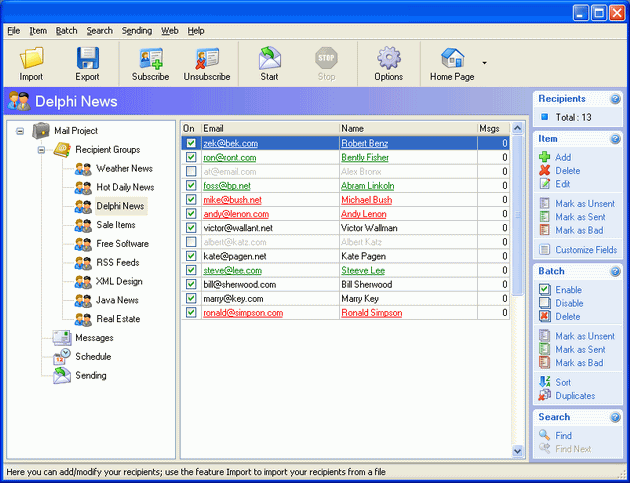
Fast Mailer Pro 6.6 Software + Serial Key

Description:-
Fast+Mailer.jpg


Fast Mailer Pro 6.6 Software | 2.3 MB

Fast Mailer Pro is a fast subscription-based mass mailer used by many Internet professionals and online store owners, to notify their customers about various events and send requested newsletters. This program lets you create and manage subscription-based mailing lists, and send personalized email messages utilizing message templates. You can easily define messages and insert macro substitution patterns, to be replaced by information from the customer database, for each recipient, just before dispatching. You can use all the standard message formats like plain text, HTML or even create a rich content message in the Microsoft Outlook Express and export it into the program. Fast Mailer Pro is easy-to-configure and lets you import an email mailing list of your existing subscribers along with all data fields into the internal database quickly and easily. It lets you do filter-based manipulations on your email list, search for duplicate emails and enable or disable individual subscribers. The program also has a subscription confirmation feature you can use to confirm that your sending is really solicited.

Security Tools - password and security tools to protect PC

1st Security Agent - protect and secure Windows PC
Security Administrator - protect PC and restrict access
Public PC Desktop - setup public access PC
Network Security Protector - network PC security
Easy Desktop Keeper - backup, restore, lock desktop layout
Disk Drive Security - protect your disk drives
File & Folder Protector - password protect files and folders
1st Evidence Remover - clean PC and remove evidence
CD-DVD Lock - password protect CD/DVD/HDD/Floppy
Access Administrator - password protect files
Access Lock - lock access to PC with password

Internet Tools - email and Internet tools, SMTP servers and mass mailers

Mass Mailer for Mac - send email to mac subscribers
Mail Bomber - organize email subscription
Fast Mailer Pro - send email to subscribers fast
Mail Server Pro - high-performance SMTP/POP3 server
Fast Mail Server - super SMTP/POP3 mail server
Local SMTP Relay Server - send emails directly
Easy Backup for Outlook Express - save, restore your data

Website Map - links to different useful pages of this website

Home Page - our home page with the full list of our software
Products - the full list of our software with detailed descriptions
About Us - information about our company
Contact Us - web form you can use to contact us
1st Security Agent FAQ - questions and answers related to 1st Security Agent
Security Administrator FAQ - questions and answers related to Security Administrator
Mail Bomber FAQ - questions and answers related to Mail Bomber
Fast Mailer Pro FAQ - questions and answers related to Fast Mailer Pro
Local SMTP Relay Server FAQ - questions and answers related to Local SMTP Relay Server
Email Security FAQ - questions and answers related to Email Security
1st Evidence Remover FAQ - questions and answers related to 1st Evidence Remover
Public PC Desktop FAQ - questions and answers related to Public PC Desktop
Sales Related FAQ - sales related questions and answers
Antispam Policy - our antispam policy
Privacy Policy - our privacy policy

OS : Win XP/2000/Vista/Win 7
Language : English

Installation :-

1. Unpack
2. Install
3. Use Keygen
4. Enjoy it !!!!

100% Clean
                                                           Download Links:-
                                          http://www.mediafire.com/?ka22s1lpkcbdqcd

Thursday, 6 October 2011

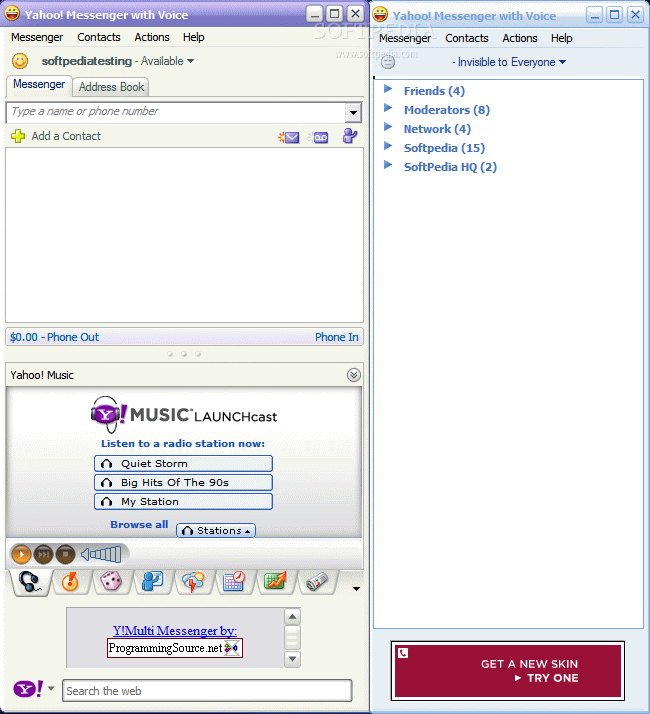
Y! Multi messenger:- Login with two yahoo ids at same time.

Just Download below attachment and Install then you will be able to login with multiple yahoo ids at the same time on the same machine..
screenshot-

Y! Multi Messenger description-

A free and useful utility that allows you to run multiple instances of Yahoo! Messenger.

Y! Multi Messenger allows you to run multiple instances of Yahoo! Messenger instead of only keeping one open.

This is perfect for those who run under several names. There are others out like this...but have an "update prompt", this does NOT have that!


Yahoo! Messenger 1.2.1.1046 Vista Beta / 9.0.0.2034 XP


Yahoo! Messenger description-

Instant messaging allows you to quickly exchange messages with your online friends

Yahoo! Messenger - Instant messaging allows you to quickly exchange messages with your online friends. Unlike e-mail, instant messages appear as soon they`re sent. By downloading the Yahoo! Messenger application to your computer, you can send instant messages to other people from around the globe, send them files or have a voice conference.

Other features include voice chat, file transfer, mail and stock quote alerts, sports scores, news, and much more.

NOTE: The Yahoo! Messenger Vista Preview works only on Vista OS.

This download is marked as adware because it displays advertisement banners or other type of commercials while running.


14.1 MB / Windows All


Google Talk 1.0.0.105


Google Talk description-


Enables you to call or send instant messages to your friends for free anytime, anywhere in the world

They say talk is cheap. Google thinks it should be free. The new messenger brought to you by Google enables any user to call or send instant messages to friends anywhere in the world for free anytime.

Here are some key features of "Google Talk":

· Choice: Get in touch how and when you want to over email, IM or a call
· Quality: Talk through your computer but hear your friends as if they were in the same room
· Convenience: Your Gmail contacts are pre-loaded into Google Talk so inviting or talking to your friends is just a click away


Size / OS: 1.3 MB / Windows All


Windows Live Messenger 2009 14.0.5027.908


Windows Live Messenger 2009 description-


The latest version of Windows Live Messenger from Microsoft

Due to a request from Microsoft, this download has been removed temporarily. However, Windows Live Messenger 9 will be available for download here as soon as it is oficially published. Check back often to ensure you don't miss it!

This is Windows Live Messenger version 2009 aka Windows Live Messenger 9, the latest version of Windows Live Messenger from Microsoft. WLM, right now, is in beta stage, so ONLY beta testers will be able to sign in!

Ta da! It's the next-generation MSN Messenger. Along with everything you already love about Messenger-your contact list, emoticons, instant access to your friends-there are brilliant new ways to connect and share your photos (and other stuff). As always, Windows Live Messenger is free to download Messenger and use most of its features.

Download

23.8 MB / Windows XP / Vista

Google Chrome 0.2.149.29 Beta

A browser that combines a minimal design with sophisticated technology to make the web faster, safer, and easier

One box for everything
Type in the address bar and get suggestions for both search and web pages.

Thumbnails of your top sites
Access your favorite pages instantly with lightning speed from any new tab.

Shortcuts for your apps
Get desktop shortcuts to launch your favorite web applications easily and quickly.

Here are some key features of "Google Chrome":

· One box for everything
· New Tab page
· Application shortcuts
· Dynamic tabs
· Crash control
· Incognito mode
· Safe browsing
· Instant bookmarks
· Importing settings
· Simpler downloads

8.4 MB / Windows XP / Vista


Firefox 3.1 Alpha 2 / 3.0.1 / 2.0.0.16 / 1.5.0.12

Firefox description-

The browser provides virus, popup and spyware protection in a simple, easy to use tabbed interface

The Firefox project (formerly Firebird, which was formerly Phoenix) is a redesign of Mozilla's browser component, written using the XUL user interface language and designed to be cross-platform.

Firefox is a small, fast and very easy to use browser that offers many advantages over other web browsers, such as the ability to block pop-up windows and the tabbed browsing.

Here are some key features of "Firefox":

· Comprehensive popup controls to keep unwanted advertising off your desktop;
· A tab browsing mode that lets you open several pages in a single window, allowing you to load links in the background without leaving the page you're on;
· Integrated search (powered by Google);
· Industry leading accessibility with Find As You Type - find links and page text by simply typing;
· Simplified privacy controls that let you cover your tracks more effectively;
· A streamlined browser window that lets you see more of the page than any other browser while at the same time being more configurable;
· A large variety of free downloadable extensions and themes that add specific functionality and visual changes to the browser.

Requirements:

· Pentium 233 MHz (Recommended: Pentium 500MHz or greater)
· 64 MB RAM (Recommended: 128 MB RAM or greater)
· 52 MB hard drive space


7.4 MB / Windows All


Opera 9.62 Build 10467

Opera description

One of the fastest, smallest and smartest full-featured web browser

The most full-featured Internet power tool on the market, Opera includes tabbed browsing, pop-up blocking, integrated searches and advanced functions like Opera's groundbreaking e-mail program, RSS Newsfeeds and IRC chat. And because we know that our users have different needs, you can customize the look and content of your Opera browser with a few clicks of the mouse.

The Opera Web browser offers several new features for functionality, security, usability, customization, searching, saving, taking shortcuts and accessing Web content.

Whether you're going to work, working from home, developing Web sites, or just looking for a quick, solid browser that can help you quickly access the Internet, Opera delivers a superior Web experience for every aspect of your online life, with lots of tech tools for power users.

Here are some key features of "Opera for Windows without Java":

■ Speed Dial.
Now you have a new way to access your favorite Web sites. Just open a new tab to get your Speed Dial. It's easy to populate and addictive to use.
Find out what other people are putting on their Speed Dial.

■ BitTorrent.
You don't need a separate BitTorrent application to download large files. Simply click a torrent link and start the download.

■ Site preferences.
Want to view a site in a different way or deny certain cookies? Want to block pop-ups on certain sites only? Right click and select "Edit site preferences".

■ Thumbnail preview.
It is easy to have many tabs open at once in Opera. But exactly which tab had that video you wanted? Hover your mouse on any tab to see a thumbnail preview.

■ Fraud protection.
Opera's advanced fraud protection protects you against web sites that try to steal your personal information.

■ Add your favorite search engines.
Right-click on the site's search field and select "Create search" from the menu.

■ Widgets.
Small Web applications (multimedia, newsfeeds, games and more) that make your desktop experience more fun. Use the Widgets menu to discover new widgets and access your favorites.

■ Transfer manager.
View download progress and access all your downloads from one simple transfer manager window.

■ Password manager.
The password manager remembers your usernames and passwords so you will not have to.

■ Mouse gestures.
Opera supports mouse gestures, allowing you to perform certain movements with the mouse to access commonly used features.

■ Notes.
Notes can be kept in conjunction with a Web site you want to refer to later, or remind you of any particular information you may like to review again.

■ Keyboard Shortcuts.
Keyboard shortcuts - like mouse gestures - make your browsing faster and more efficient. Read more about all the keyboard shortcuts in Opera.

■ Tabbed browsing.
Surf the Web easier and faster by opening multiple Web pages within the same application window

■ Integrated search.
Search Google, eBay, Amazon and more with our integrated search field. You can also search directly in the address field using keywords

■ Fast Forward.
Fast Forward will detect the most likely "next page" link and greatly simplify navigation in multi-page documents such as search results and image galleries.

■ Voice.
The voice feature allows you to control Opera's interface by talking and to have documents read aloud. Voice is currently offered in English

■ Full-screen mode.
The F11 key toggles Opera's projection mode, using the whole screen for browsing and, if a projection style sheet is present, displays 'slides' suitable for presentation.

■ Kiosk mode.
Opera supports kiosk mode - a lock-down mode in which the browser can be used for unattended computers in public places.

■ Opera mail.
Our built-in POP/IMAP E-mail client is a combined e-mail program, news reader, mailing list organizer and RSS/Atom newsfeed reader.

■ Standards support.
We take pride in supporting all major Web standards currently in use, including CSS 2.1, XHTML 1.1, HTML 4.01, WML 2.0, ECMAScript, DOM 2 and SVG 1.1 basic.

Requirements:

· 20 MB of free disk space.

Download

5.3 MB / Windows All

Monday, 3 October 2011

Mozilla Firefox 4.0 Alpha 1 Pre

Firefox is a open-source web browser for Windows, Linux and Mac OS X and is based on the Mozilla codebase. It is small, fast and easy to use, and offers many advantages over Internet Explorer, such as the ability to block pop-up windows. Licence: Open-Source.


Download

size : 6 mb
(OS : Windows7, Windows Vista, Windows XP)


Internet Explorer 8 (New)


Making Your Web Faster, Easier and Safer
View any site with ease
Now you can quickly display websites that were designed for older browsers. If you’re looking at a page and the text or images aren’t lined up right, just use the new Compatibility View button next to the Refresh button on the Address Bar.

Download

16 MB / Windows XP

----------

Download

13 MB / Windows VISTA

Opera 10 Final (Turbo)


Opera 10.0 has reached the release candidate stage.

What this means is that Opera 10.0 should be considered to be in a stable state code-wise, and that only selected fixes will be added if necessary. Apart from those (if any), the RC should be considered ready for release testing for Opera 10.0.


Perhaps the most obvious change in this RC is the new application icon, designed by Oleg Melnychuk. The red O will continue to represent Opera, but it has received a major facelift. It is also available in bigger sizes that before for Windows and Mac, so that you can view it in all its glory on your desktop.

The document icon has also been updated.

Note to Mac and Windows users

This RC will no longer use the beta preferences on Mac, but will upgrade your old 9.64 preferences. Windows has been switched over to the non-beta installation path as well.

Help us find the world's slowest connection

Before you start testing the RC, we would like you to meet Odd & Even, two brothers from a family with good strong packing traditions. They have been hired to pack Web pages for Opera, and now they're on a mission to fix the world's slowest connection. If you know a place with a slow internet connection, let them know in the forums!

Click here to download:-

Google Earth Pro 2008 Gold Full Version


Google Earth combines satellite imagery, maps and the power of Google Search to put the world’s geographic information at your fingertips. Fly from space to your neighborhood. Type in an address and zoom right in. Search for schools, parks, restaurants, and hotels. Get driving directions. Tilt and rotate the view to see 3D terrain and buildings. Save and share your searches and favorites. Even add your own annotations.

Google Earth lets you do smooth sailing flybyes of the entire Earth. You can easily fly to any spot on the globe, by entering any associated data, like street addresses, place names or lat/long coordinates. There are overlays that put additional information on the map, like roads, international boundaries, terrain, 3D buildings, crime statistics, schools, stadiums, any number of interesting stuff. You can do Local searches in the program, with icons on the map and a display on the side showing your results.

You can leave notes, called "placemarks" all over the map, so you can remember where all sorts of places are. Searches and placemarks can be saved as bookmarks in "My Places". Everything can be output in an XML format called KML, that will allow the vast popularity of Google Maps to continue in Earth. You can also email a JPEG of the map, or send a KMZ file if you know the recipient has Earth installed.

Features:
- Sophisticated streaming technology delivers the data to you as you need it.
- Imagery and 3D data depict the entire earth - Terabytes of aerial and satellite imagery depict cities around the world in high-resolution detail.
- Local search lets you search for restaurants, hotels, and even driving directions. Results show in your 3D earth view. Easy to layer multiple searches, save results to folders, and share with others.
- Layers show parks, schools, hospitals, airports, retail, and more.
- Overlays – import site plans, design sketches and even scanned blueprints.
- Annotate the view with lines and polygons.
- Spreadsheet import - ingest up to 2,500 locations by address or lat/lon.
- KML – data exchange format let your share useful annotations.

Use it for:
- Planning a trip
- Getting driving directions
- Finding a house or apartment
- Finding a local business
- Exploring the world
Click to download:-

Latest Google Chrome 4

Google Chrome 4


Download Google Chrome 4 Seems that Google is upgrading Chrome browser versions at a faster rate than competitors like Firefox,IE and Safari . The application already entered the phase four of development by the release of Google chrome 4 . We earlier covered the release of Google Chrome 3 that added support for extensions to Chrome browser .While the stable version continues as Chrome 2 , Google Chrome 3 and and Chrome 4 are faster and offer extensive features . Changes in Google chrome version 4 are bookmark synchronization , faster JavaScript engine ,improved support for new HTML 5 tags and bug fixes from previous versions . There is no changes in external appearance and position of controls and settings .But you will notice a faster page load and improved rendering of script intensive pages . Developers and enthusiast can download Google chrome 4 here .

Click here to download:-
http://www.mediafire.com/?z3znojdzmuu

Yahoo messenger 10 full offline installer

Yahoo messenger 10


Yahoo released final version of Windows 7 compatible Yahoo messenger 10. Yahoo messenger 10 was in testing for the last couple of months. The final version now available comes with new features and bug fixes. The most interesting features in Yahoo messenger 10 are its redesigned video calling and Yahoo updates facilities that strengthens its possibilities as a social media application. Yahoo messenger 10 now available for download at official Yahoo website. But the problem with the official installer is that its not full and standalone. They will provide one online installer that will ask you connect internet and download online each time. So here is a offline installer for Yahoo messenger 10 that you can backup for future installations.

Features of Yahoo Messenger 10 final-

Video calls on Yahoo messenger 10 :

As I said earlier, the new Yahoo messenger 10 has improved video calling facilities. Video and sound quality of the calls have been improved a lot . Like in the case of Gmail video call, now we can make face to face video conversation in Yahoo messenger 10 . There is option to hold or mute video calls, add animations and effects etc. Yahoo messenger 10 supports full screen video calls with the ability to swap windows and to position video windows side-by-side.

Yahoo updates :

Updates from your Yahoo friends will be displayed in Y! updates window. This includes their social media activity from Twitter, Facebook and others , status messages and blogs. For this you need to customize your Yahoo profile and add services . There is an option to set status message on Yahoo Messenger itself with a link if required. This is different from old busy-away-available status messages, and it will appear on friend’s Y! updates time line.

All other features of older Yahoo messenger versions are also available with Yahoo messenger 10 . This includes international calls and SMS though Yahoo! voice, group chat,voice mail, Yahoo chat, smileys, plugins to add more features, IM environments, Yahoo PingBox and others.


Yahoo messenger 10 full offline installer

What’s the need of a full offline installer of Yahoo messenger 10.

Yahoo messenger 10 offline standalone installer is well suited for dial up internet users. They won’t be able to download YM 10 each time after new Windows installations. Others can also download full installer for backup process or for creating Windows DVDs with pre-installed Yahoo messenger.

Click here to download:-
http://www.mediafire.com/?xnmdjitn2yz

Firefox Powerfull Suite 3.6.2010 Full Version

Firefox Powerfull Suite 3.6.2010 Full Version


Mozilla Firefox - the browser works very quickly, and the speed of apparent not only during loading of Web pages, but when looking at bookmarks and history. Made it through the engine, and Mozilla allows you to view all web pages in one window mnogovkladochnom and also has many other useful options, including the ability to significantly enhance connectivity plug-ins (and released their great number).

Features of Mozilla Firefox:
"Pop-Up Blocker (born pop-up)
"Tabbed browsing (born tabbed browsing) (multiple pages in one window)
"Built-in search bar in search engines and dictionaries
"The so-called" Live Bookmarks "(born Live bookmarks) - mechanism for integrating RSS-flows
"Ample opportunities for setting up the behavior and appearance
"Support for multiple extensions
"Built-in tools for web developer
"Automatic updates of both the browser and its extensions (version 1.5)
"Display content at once (makes it comfortable to continue surfing even with incomplete page loads, which is particularly noticeable on a slow connection and a large number of embedded objects)
Pop-up Blocker
You will no longer annoying pop-up windows that open when you visit many sites. You can manually specify which sites allow pop-ups, but with what not.
Security
You are spared from the various spyware programs, as well as elements of ActiveX. You can independently control their privacy, flexibility to manage their personal data. The browser allows you to instantly remove the traces of their stay in the network.
Smart Search
Search Bar, located next to the line input allows you to search any data in the global network. You can use multiple search engines.
Live Bookmarks
Support for RSS is built into the browser. Create live bookmarks and keep up with all the latest happenings in the world.
A single repository for the magazine and bookmarks
Add site to bookmark, thanks to the yellow star in the address bar, it is now possible with one click. Manage Bookmarks, and standardized and implemented in a single dialog box. Select the required options become more convenient due to the presence of special groups recently added bookmarks, and most frequently visited websites.
Intellectual Lilly
As soon as you start typing the address immediately a window appears with the tips, where the bold type shows all matches. The window contains a list of previously visited sites. String correctly responds not only to the addresses of sites, but also on their titles, which greatly simplifies and speeds up input. They are displayed in the window with a history of previously opened websites. Even if you do not remember the exact address and name of the resource will tell you the true path.
Quick and easy downloading files
Completely redesigned download manager allows pumps a file after a disconnection. The status bar always shows the number of received files and the approximate time until the download is complete.
Automatic Updates
You no longer need to manually download new versions of the browser as they are released. The system updates automatically download a small patch the size of a few hundred kilobytes, saving you time.
Optimal base composition
Simple, intuitive browser has everything that you may need in everyday life. Bookmarks magazine, full-screen mode, zoom text and much more - all this takes place in Mozilla Firefox.
Extensibility
Mozilla Firefox - the most scalable and flexible customizable browser on the planet. You can customize the toolbar to put additional expansion modules and themes. Like the telescopic fishing-rod, Mozilla Firefox can be converted from a small compact browser amazingly multifunctional tool to explore the World Wide Web.
Developer's best friend
Mozilla Firefox includes a built-in console error notifications on web pages. Additional extensions like Firebug, you can easily develop and debug web pages.

Used extensions: [68]
- AbcTajpu 1.6.7
- Adblock Plus 1.1.3
- Adblock Plus: Element Hiding Helper 1.0.6
- AddThis 3.0.1
- AniWeather 0.7.4
- Answers 2.3.54
- Auto Copy 1.0.1
- AutoPager 0.6.0.20
- Better Gmail 2 1.1.1
- Better GReader 0.8.3
- BetterCache 1.24
- Billeo 2.1.0.7
- ColorfulTabs 4.3
- CoolPreviews 3.0.1
- Copy Link Text 1.4.6
- CuteMenus - Crystal SVG 1.9.3
- CyberSearch 2.0.5
- Dictionary Switcher 1.0.1
- Download Manager Tweak 0.9.2
- Download Statusbar 0.9.6.7
- DownThemAll! 1.1.9
- Facebook Toolbar 1.4.3
- Favicon Picker 3 0.5
- Feed Sidebar 4.3.1
- Feedly 2.14
- Firefox Showcase 0.9.5.5
- FireFTP 1.0.7
- FireShot 0.80
- Flagfox 4.0.3
- FoxLingo 2.6.1
- FoxTab 1.3
- Friendbar 4.0.3
- Google Shortcuts 1.9.2
- IMacros for Firefox 6.6.0.1
- Integrated Gmail 2.5.5
- Is.gd Creator 0.2.2
- Lazarus: Form Recovery 2.0.5
- Menu Editor 1.2.6
- MR Tech Toolkit 6.0.4
- Multiple Tab Handler (treatment group tabs) 0.5.2010032801
- MultirowBookmarksToolbar 4.9
- NoScript 1.9.9.57
- Organize Status Bar 0.6.4
- Personal Menu 4.3.2
- Picnik 2.3
- Pixlr Grabber 2.0.3
- Qtl 14.1
- Quick Locale Switcher 1.7.0.1
- QuickProxy 2009.07.19
- Read It Later 2.0.3
- ReminderFox 1.9.7
- RSS Ticker 3.0.4
- Russian spellchecking dictionary 0.4.3
- ScrapBook 1.3.7
- SearchPreview 4.2
- Secure Login 0.9.3
- StumbleUpon 3.63
- Tab Mix Plus 0.3.8.2
- Tab Preview 0.3
- Tab Sidebar 2.5
- Targeted Advertising Cookie Opt-Out (TACO) 2.0
- TinEye Reverse Image Search 0.7.1
- Update Scanner 3.1.2
- VideoSurf Videos at a Glance 0.71
- Weave Sync 1.1
- WikiLook 2.5.5
- WOT 20091028
- Xmarks 3.5.10

The switching extensions: [1]
- Russian (RU) Language Pack 3.0.10

The total number of extensions: 69

Installed Themes: [1]
- Standard

Installed Plugins: (6)
- Java (TM) Platform SE 6 U10
- Microsoft ® DRM
- Mozilla Default Plug-in
- Shockwave Flash
- Shockwave for Director
- Windows Media Player Plug-in Dynamic Link Library

Click here to download:-
http://1337x.org/torrent/62794/Firefox-Powerfull-Suite-3-6-2010-niceuploader/ 

Internet Explorer 9 IE 9 (Pre2)

IE 9 (Pre2)


Internet Explorer 9 is shaping out to be quite a significant jump over its current incarnation i.e. Internet Explorer 8. The first platform preview of IE9, which was released back in March at MIX10 had significant performance increase over IE8. The new IE9 Preview 2 has even more improvements. The first platform preview of IE9 scored an impressive 55 out of 100 on Acid3 test. This number has now reached 68.


This new build also improves javascript and HTML5 performance. The full hardware acceleration for HTML5 in IE9 takes the workload off your computer's processor, throwing the extra visual bits to the graphics chipset to handle, and hence increasing performance.

no hints about when the public beta of Internet Explorer 9 will be available. The platform preview is showing impressive results with every new build. We hope to see this trend continue.

You can try out IE9 Platform Preview now and take it for a test drive to see the improvements for yourself.

Click here to download:-
http://www.mediafire.com/?m1u3edz15b523ue

LinkWithin

Related Posts Plugin for WordPress, Blogger...

 
Design by Free WordPress Themes | Bloggerized by Lasantha - Premium Blogger Themes | Lady Gaga, Salman Khan